Python Variables and Data Types - Chapter: 2

Hey there! I'm a passionate tech enthusiast with a diverse skill set in software development, DevOps, and cybersecurity. I love building robust APIs with Python Django and creating interactive user interfaces with React.js. My journey has taken me through the fascinating world of IoT, where I've tinkered with Arduino and Rasberry Pi devices, and I've also delved into the exciting realm of ethical hacking and penetration testing.
Technologies I Know:
Python Django Framework for API: I have hands-on experience in building APIs using the powerful Python Django framework, enabling me to create scalable and efficient web applications.
React.js for Frontend Development: With proficiency in React.js, I craft engaging and responsive user interfaces, making the web experience seamless and enjoyable.
Python Automation Testing with Selenium, Pytest, and Appium: My expertise in automation testing using Selenium, Pytest, and Appium ensures that software projects are thoroughly tested, reducing manual effort and improving the overall quality of the code.
AWS DevOps with Git, Jenkins, Docker, SonarQube, Terraform, Ansible, Kubernetes, and Maven: I've mastered various DevOps tools and practices on the AWS platform, streamlining the development and deployment process. Git, Jenkins, Docker, SonarQube, Terraform, Ansible, Kubernetes, and Maven are among the tools I'm proficient in.
IoT with Arduino and Raspberry Pi: Exploring the Internet of Things world, I've successfully worked with Arduino and Raspberry Pi to build exciting and innovative projects that leverage sensor data and real-world interactions.
Certified Ethical Hacking and Penetration Testing: My passion for cybersecurity has driven me to become a Certified Ethical Hacker. I conduct penetration testing to identify and fix security vulnerabilities, ensuring systems and applications are protected against potential threats.
Tokens:
A token is the smallest element of a Python script that is meaningful to the Interpreter during the lexical analysis phase. There are five categories of tokens, which are:
Identifiers: These are names used to identify variables, functions, classes, or modules. The Python Identifiers are made up of a combination of lowercase
(a-z) or uppercase (A-Z) letters, digits (0–9), or an underscore (_).
Examples: abc, x12y, ABC, ABC123_as, India_143, stud, Roll_no, etc.Literals: A fixed numeric or non-numeric value is called a literal. It can be defined as a number, text, or other data that represents a value to be stored in a variable.
Examples: 5 --> integer, 5.5 --> float, "Sachin" --> string, 1 +4j --> complex, True --> boolean, [1, 2, 'Vishnu'] --> list, (1, 2, 'Vishnu') --> tuple,
{'name':'sachin', 'age': 29, 101: 101} --> dictionary.Keywords: These are reserved words in Python that have a specific meaning and cannot be used as identifiers.
Examples: if, else, for, while, def, class, etc.Operators: These are symbols used to perform operations on variables or values.
Examples: +, -, *, /, %, ==, !=, >, <, and, or, not, etc.Delimiters: These are characters used to separate or group different parts of the code.
Examples: ( ) { } [ ] , : ;Comments: These are used to add explanatory notes or annotations to the code. They are not executed by the interpreter.
Examples: # This is a comment, ''' This is a multiline comment '''# Identify tokens in the script
x = 68
y = 10
z = x/y
print("x, y, z are:",x,y,z)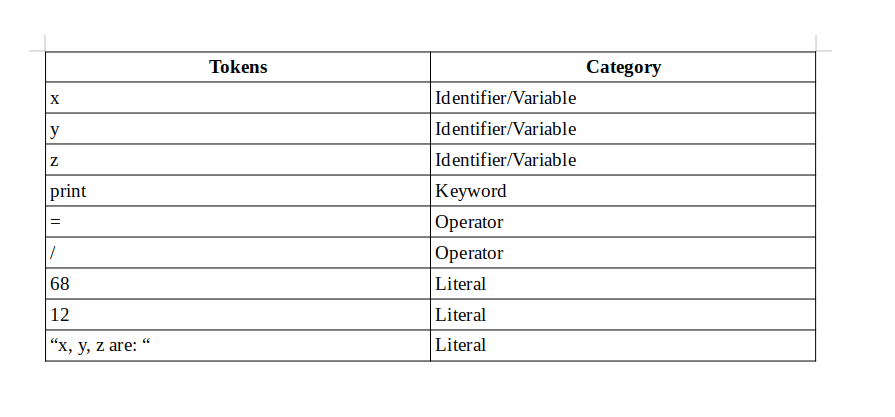
Variables / Identifier:
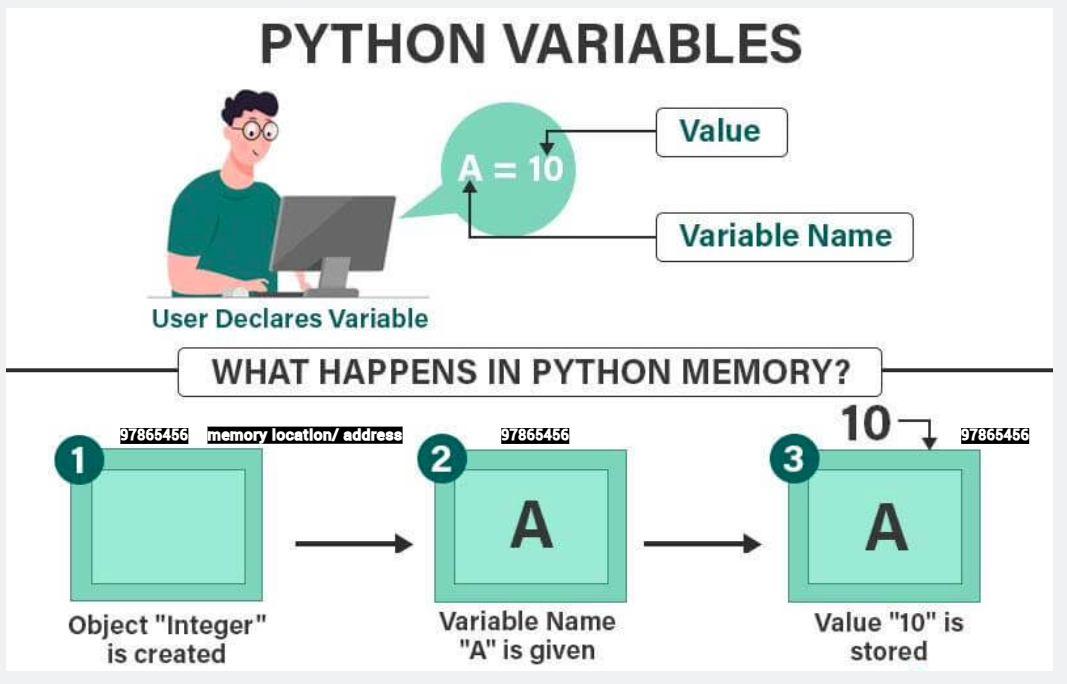
A variable is like a container that stores values that you can access or change in a program. A variable is a name (class, function, or module) that refers to a specific location in the computer's memory where the data is stored.
Rules to define Variables / Identifiers in Python:
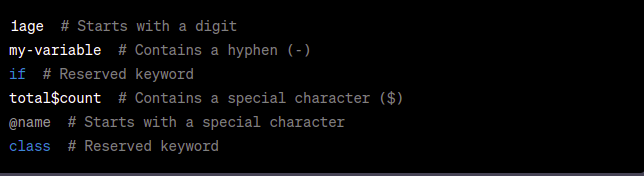
--> Valid Characters: Variable names can consist of letters (both uppercase and lowercase), digits, and underscores (_). However, they must start with a letter or underscore. Special characters like @, $, and % are not allowed in variable names. Variable names should not start with digits.
--> Case-Sensitivity: Python is case-sensitive, meaning that variables with different capitalizations are considered distinct. For example, myVariable, myvariable, and MyVariable are treated as three separate variables.
--> Reserved Words: You cannot use reserved words (also known as keywords) as variable names because they have special meanings in Python. Examples: if, else, for, while, def, class, True, etc. You can refer to the official Python documentation for a complete list of reserved words.
--> Length: Variable names can be of any length, but it's recommended to use descriptive names that are meaningful and easy to understand. Longer variable names can improve code readability.
--> Meaningful Names: Choose variable names that are descriptive and convey the purpose of the variable. This helps make your code more readable and understandable. For example, instead of x or a, you could use age, total_count, or student_name.
--> Style Conventions: Python follows a style guide called PEP 8, which provides recommendations for writing Python code. According to PEP 8, variable names should be in lowercase, and words within the name should be separated by underscores (snake_case). For example, my_variable, student_age, or total_count.
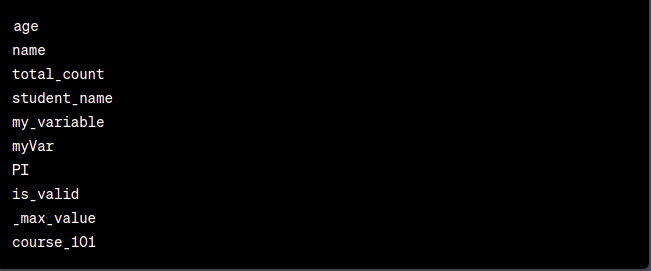
Examples of valid variable names:
Examples of Invalid variable names:
Reserved Words:
In Python, there are several reserved words, also known as keywords, that have predefined meanings and cannot be used as identifiers (variable names, function names, etc.). There are 33 reserved words available in Python
>>> import keyword
>>> print(keyword.kwlist)
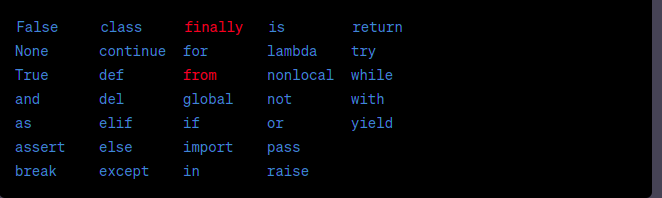
These keywords are an integral part of the Python language and have specific purposes within the syntax and structure of the code. It's important to avoid using these words as identifiers to prevent conflicts and ensure code readability and correctness.
Data Types:
Data Type represents the type of data present inside a variable. In Python, it is not required to specify the type explicitly; based on the value provided, the type will be assigned automatically. Hence, Python is called a dynamically Typed Language.
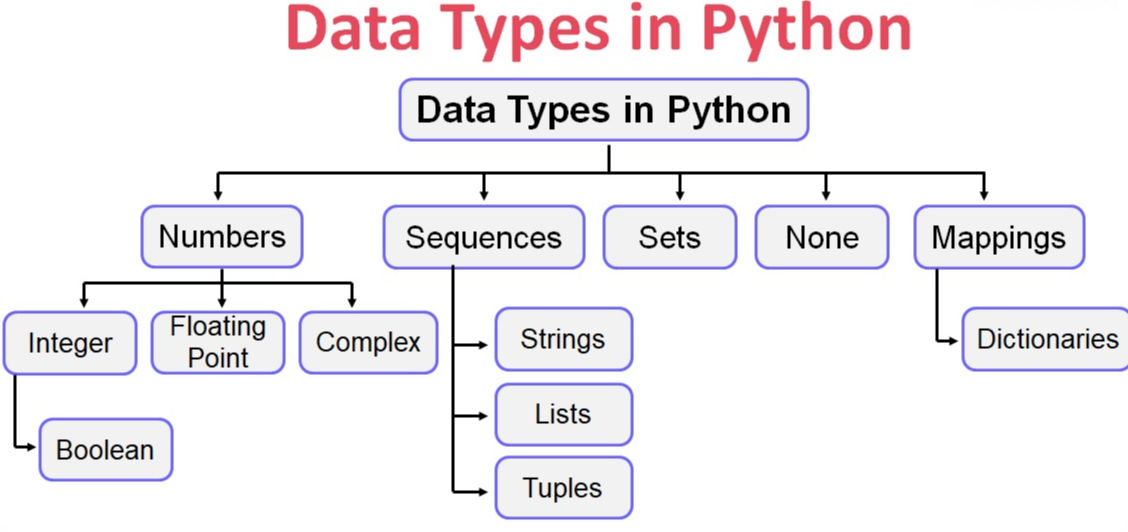
Note: Python contains several in-built functions.
--> Identity: It refers to the address of the variable in memory, which does not change once created. To retrieve the address (identity) of a variable, the id() function is used.
>>> id(variable_name)
--> Type: To check the type of the variable, check the type of the variable. The type () is the function used.
Eg: type(variable_name)
>>> x = 20
>>> type(x)
>>> <class 'int'>
--> Print: To display the value in Python, use the print() function or method.
>>> x =20
>>> print(x)
>>> 20
1) int: In Python, the int data type is used to represent integers, which are whole numbers without a fractional component. The int data type is used to store and perform operations on numerical values that are integers.
We can represent integer values in the following ways:
--> Decimal form (Base-10): it is the default number system in Python. The allowed digits are 1–9.
Eg: num = 10
In the above example, num is assigned the decimal value 10, which is an integer.
--> Binary form (Base-2): The allowed digits are 0 and 1. In Python, when you want to represent a literal value as a binary number, you can prefix it with 0b or 0B to indicate that it is a binary value. This prefix is used to distinguish binary literals from other numerical representations.
Eg: num1 = 0b1010 # Binary representation of decimal 10
num2 = 0B110011 # Binary representation of decimal 12
In the examples above, 0b and 0B are used to denote that the following digits represent binary numbers. The binary literals 1010 and 110011 are assigned to the variables num1 and num2, respectively.
--> Octal form (Base-8): The allowed digits are 0 to 7. In Python, when you want to represent a literal value as an octal number, you can prefix it with 0o or 0O to indicate that it is an octal value.
Eg: num1 = 0o12 # Octal representation of decimal 10
num2 = 0o20 # Octal representation of decimal 16
In the example above, 0o and 0O are used to denote that the following digits represent octal numbers. The octal literals 12 and 34 are assigned to the variables num1 and num2, respectively.
--> Hexadecimal form (Base-16): The allowed digits are 0 to 9, A-F (both upper and lower case), by prefixing it with 0x or 0X. This prefix is used to indicate that the following digits represent a hexadecimal value.
Eg: num1 = 0x1A # Hexadecimal representation of decimal 26
num2 = 0x0F # Hexadecimal representation of decimal 15
In the example above, 0x and 0X are used to denote that the following digits represent hexadecimal numbers. The hexadecimal literals 1A and 0F are assigned to the variables num1 and num2, respectively.
2) float: In Python, the float data type is used to represent floating-point numbers. A floating-point number is a numeric value that has a fractional component. It can represent both whole numbers and numbers with decimal points.
Eg: pi = 3.14
temperature = 25.5
Python supports scientific notation for representing very large or very small floating-point numbers.
Eg: big_number = 1.2e6 # 1.2 million (1,200,000)
small_number = 1.2e-3 # 0.0012 (1.2 * 10^-3)
3) complex: In Python, the complex data type is used to represent complex numbers. A complex number is a number that comprises both a real part and an imaginary part. It is represented in the form a + bj, where a is the real part, b is the imaginary part, and j represents the imaginary unit (the square root of -1).
To create a complex number by using the complex() constructor or by directly writing the expression in the form a + bj.
Eg: z1 = complex(2, 3) # 2 + 3j
z2 = 1 + 2j
Complex numbers are often used in mathematical and engineering applications that involve quantities with both real and imaginary components, such as signal processing, control systems, and scientific simulations.
4) bool: In Python, the bool data type is used to represent Boolean values. A Boolean value can have one of two possible states: True or False. Booleans are fundamental in logic and are commonly used for making decisions and controlling the flow of a program through conditional statements. Internally, Python represents True as 1 and False as 0.
Eg: x = True
y = False
print(x) # output True
print(y) # output False
5) str: In Python, the str data type is used to represent strings, which are sequences of characters. A string is a collection of characters enclosed within either single quotes ('...') or double quotes ("...").
Eg: name = 'John' ``message = "Hello, World!"
--> Multiline Strings: Triple quotes ('''...''' or """...""") can be used to create multiline strings:
poem = '''Roses are red, Violets are blue, Sugar is sweet, And so are you.'''
--> Concatenation: Strings can be concatenated using the + operator:
first_name = 'John' last_name = 'Doe' full_name = first_name + ' ' + last_name print(full_name) # john Doe
--> String Indexing: You can access individual characters in a string using indexing. Indexing can be done in two types: Left to Right and Right to Left.
Left-to-right indexing will start with 0, and right-to-left indexing will start with -1.
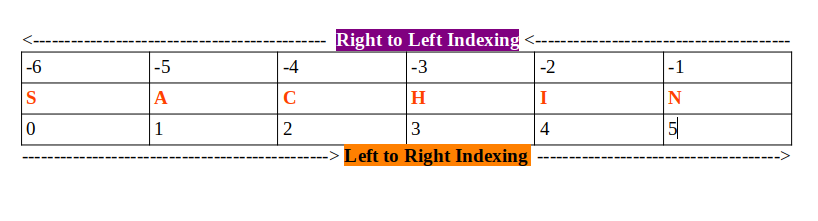
Eg:
my_string = "SACHIN"
first_char_l_r = my_string[0] # 'S'
secd_char_l_r = my_string[1] # 'A'
first_char_rl = my_string[-1] # 'S'
fourth_char_l_r = my_string[-4] # 'C'
--> What is Slicing?: In Python, slicing is a technique used to extract a portion (a slice) of a sequence, such as a string, list, or tuple. It allows you to extract a substring or sublist from the original sequence by specifying a range of indices.
The basic syntax for slicing is: sequence[start:stop:step]
start - The index of the first element to include in the slice. The slicing range starts from this index.
stop - The index of the first element to exclude from the slice. The slicing ends just before this index.
step - The interval between elements to include in the slice. The default step is 1, meaning consecutive elements are included.
a. slicing in string
my_string = "Sachin Tendulkar"
substring = my_string[0:5] # 'Sachi'
substring2 = my_string[7:12] # 'Tendu'
b. Slicing with Negative Indices:
my_string = "Sachin Tendulkar"
substring = my_string[-14:-1]
print(substring) # 'chin Tendulka'
c. Slicing with Step:
my_string = "Sachin Tendulkar"
substring = my_string[1:16:2]
print(substring) # 'ahnTnukr'
Note: Remember that slicing is inclusive of the start index and exclusive of the stop index. If you omit the start index, slicing starts from the beginning of the sequence. If you omit the stop index, slicing goes up to the end of the sequence. If you omit the step, it defaults to 1.
6) List: In Python, the list data type is used to represent ordered collections of elements. Lists are mutable, meaning you can change their content by adding, modifying, or removing elements. Lists can contain elements of different data types, and they are denoted by square brackets [ ].
--> Declaration and Assignment: You can create a list by enclosing elements in square brackets [ ].
Eg:
numbers = [1, 2, 3, 4, 5]
fruits = ['apple', 'banana', 'cherry']
mixed_list = [1, 'hello', 3.14, True]
--> Accessing Elements: access individual elements in a list using indexing left-to-right or right-to-left.
Eg:
my_list = [10, 20, 30, 40, 50]
first_element = my_list[0] # 10
third_element = my_list[2] # 30
element_1 = my_list[-1] # 50
element_2 = my_list[-4] # 20
--> Slicing: slice a list to extract a portion of it.
Eg:
my_list = [1, 2, 3, 4, 5, 6, 7, 8, 9]
sublist = my_list[2:6] # [3, 4, 5, 6]
--> Mutability: Lists can be modified by adding, changing, or removing elements.
Eg:
my_list = [1, 2, 3]
my_list[0] = 10 # Modifying an element - 1
my_list.append(4) # Adding an element at the end - [1, 2, 3, 4]
my_list.insert(7, 2) # Adding an element at a specific index - [1, 2, 7, 3]
my_list.remove(3) # Removing an element by value - [1, 2]
--> List Methods: Python provides a wide range of built-in list methods for various list operations, such as append(), insert(), remove(), pop(), index(), sort(), len(), and many more.
Eg:
my_list = [3, 1, 4, 2] my_list.sort() # Sorting the list in place - [1, 2, 3, 4] length = len(my_list) # Getting the length of the list print(length) # 4
my_list.pop(1) # remove an element from the specific index - [3, 4, 2]
my_list.index(4) # return the index number of the value - 2
7) Tuple: In Python, a tuple is another type of ordered collection, similar to lists, but with a key difference: tuples are immutable, meaning once created, their content cannot be changed or modified. Tuples are denoted by parentheses ( ).
--> Declaration and Assignment: Create a tuple by enclosing elements in parentheses ( ).
Eg:
my_tuple = (1, 2, 3)
fruits_tuple = ('apple', 'banana', 'cherry')
mixed_tuple = (1, 'hello', 3.14, True)
--> Accessing Elements: Access individual elements in a tuple using indexing, just like with lists.
Eg:
my_tuple = (10, 20, 30, 40, 50)
first_element = my_tuple[0] # 10
third_element = my_tuple[2] # 30
--> Immutable Nature: Unlike lists, tuples cannot be modified after creation. Once a tuple is defined, its elements cannot be changed, added, or removed.
Eg:
my_tuple = (1, 2, 3)
my_tuple[0] = 10 # This will raise an error (TypeError: 'tuple' object does not support item assignment)
--> Single-Element Tuples: When defining a single-element tuple, you must include a trailing comma to differentiate it from regular parentheses.
Eg:
single_element_tuple = (42,) # Single-element
tuple not_a_tuple = (42) # Not a tuple; evaluates to an integer
--> Tuple Packing and Unpacking: Pack multiple values into a tuple or unpack the values from a tuple into separate variables.
Eg:
# Packing
coordinates = (10, 20)
# Unpacking
x, y = coordinates
Note: Tuples are useful when you have a collection of elements that should remain constant throughout the program's execution. For example, you can use tuples to represent fixed data, such as geographic coordinates or RGB color values.
Tuples are generally used when you want to create a collection of items that should remain unchanged, ensuring data integrity and preventing accidental modifications. The immutability of tuples makes them suitable for specific use cases, such as keys in dictionaries (which require immutable objects) or when you want to ensure the integrity of data passed between functions or across the program.
8) Set: In Python, a set is an unordered collection of unique elements (duplicates are not allowed). It is denoted by curly braces { } or by using the set() constructor. Sets do not allow duplicate elements, the order is not preserved, and the index concept is not applicable.
--> Declaration and Assignment: You can create a set by enclosing elements in curly braces.
Eg:
my_set = {1, 2, 3}
fruits_set = {'apple', 'banana', 'cherry'}
Alternatively, the set() constructor can be used to create a set:
my_set = set({1, 2, 3})
print(type(my_set)) # <class 'set'>
--> Uniqueness of Elements: Sets automatically remove duplicate elements, ensuring that each element appears only once.
Eg:
my_set = {1, 2, 3, 2, 4, 5, 1}
print(my_set) # Output: {1, 2, 3, 4, 5}
--> Mutability: Sets are mutable, meaning you can add or remove elements after their creation.
Eg:
my_set = {1, 2, 3}
my_set.add(4) # Adding an element
print(my_set) # {1, 2, 3, 4}
my_set.remove(2) # Removing an element
print(my_set) # {1, 3, 4}
--> Set Operations: Sets support various set operations, such as union, intersection, difference, and more.
Eg:
set1 = {1, 2, 3}
set2 = {3, 4, 5}
union_set = set1 | set2 # Union: {1, 2, 3, 4, 5}
intersection_set = set1 & set2 # Intersection: {3}
difference_set = set1 - set2 # Difference: {1, 2}
--> Membership Testing: Test whether an element is present in a set using the in keyword.
Eg:
my_set = {1, 2, 3}
is_present = 2 in my_set # True
is_present = 4 in my_set # False
Note: Sets are useful when you need to work with collections of unique elements and perform various set operations efficiently. They are commonly used to remove duplicates from a list, perform set arithmetic, and check for membership in a group of elements.
9) frozenset: In Python, frozenset is a built-in data type that represents an immutable version of a set. Like sets, frozenset is also an unordered collection of unique elements. However, once a frozenset is created, its elements cannot be modified, added, or removed. It is denoted by using the frozenset() constructor.
--> Declaration and Assignment: To create a frozenset by passing an iterable (e.g., a list, tuple, or another set) to the frozenset() constructor.
Eg:
my_frozenset = frozenset([1, 2, 3])
fruits_frozenset = frozenset({'apple', 'banana', 'cherry'})
--> Uniqueness of Elements: Like sets, frozenset automatically removes duplicate elements, ensuring that each element appears only once.
Eg:
my_frozenset = frozenset([1, 2, 3, 2, 4, 5, 1])
print(my_frozenset) # Output: frozenset({1, 2, 3, 4, 5})
--> Immutability: The key feature of frozenset is its immutability. Once a frozenset is created, you cannot modify its elements or perform set operations that would change its content.
Eg:
my_frozenset = frozenset([1, 2, 3])
my_frozenset.add(4) # Raises an AttributeError: 'frozenset' object has no attribute 'add'
my_frozenset.remove(2) # Raises an AttributeError: 'frozenset' object has no attribute 'remove'
--> Set Operations: Although the frozenset is immutable and cannot be changed directly, you can still perform set operations with other sets or frozensets.
Eg:
set1 = {1, 2, 3}
frozenset1 = frozenset({3, 4, 5})
union_set = set1 | frozenset1 # Union: {1, 2, 3, 4, 5}
intersection_set = set1 & frozenset1 # Intersection: {3}
difference_set = set1 - frozenset1 # Difference: {1, 2}
Note: frozenset is useful when you need to create an immutable set, such as when the user wants to use sets as keys in dictionaries or elements in another set. Since dictionaries require their keys to be immutable, using frozenset allows you to create dictionaries with frozenset keys.
10) dict: In Python, a dict (short for "dictionary") is a built-in data type that represents an unordered collection of key-value pairs. Duplicate Keys are not allowed, but values can be duplicated. If the user is trying to insert an entry with a duplicate key, the old value will be replaced with the new value. It is also known as an associative array or a hash map in other programming languages. Dictionaries are denoted by curly braces { } and use colons : to separate keys from their corresponding values.
--> Declaration and Assignment: The user can create a dictionary by enclosing key-value pairs in curly braces { }.
Eg:
my_dict = {'name': 'John', 'age': 30, 'city': 'New York', 101: 15}
fruits_dict = {'apple': 1, 'banana': 2, 'cherry': 3}
--> Accessing Values: To access values in a dictionary by using their keys
Eg:
my_dict = {'name': 'John', 'age': 30, 'city': 'New York'}
name_value = my_dict['name'] # 'John'
age_value = my_dict['age'] # 30
--> Adding or Modifying Elements: To add new key-value pairs or modify existing ones in a dictionary
Eg:
my_dict = {'name': 'John', 'age': 30}
my_dict['city'] = 'New York' # Adding a new key-value pair
my_dict['age'] = 31 # Modifying an existing value
--> Dictionary Methods: Python provides a variety of built-in dictionary methods, such as keys(), values(), items(), get(), pop(), and more, for various dictionary operations.
Eg:
my_dict = {'name': 'John', 'age': 30, 'city': 'New York'}
keys_list = my_dict.keys() # ['name', 'age', 'city']
values_list = my_dict.values() # ['John', 30, 'New York']
items_list = my_dict.items() # [('name', 'John'), ('age', 30), ('city', 'New York')]
--> Checking for Key Existence: To use the in keyword to check if a key exists in a dictionary
Eg:
my_dict = {'name': 'John', 'age': 30, 'city': 'New York'}
has_name = 'name' in my_dict # True
has_gender = 'gender' in my_dict # False
Note: Dictionaries are widely used in Python for various purposes, such as representing configurations, mapping, caching, and more. They are highly efficient for looking up values based on their keys, making them a fundamental data structure in Python programming.
Previous Chapter: Chapter: 1
Next Chapter: Chapter: 3